Adding and activating a device in the Online Customer Account (OCA)
July 21, 2026
#recommended

To be able to pay the road toll in the Electronic Toll Collection System, you need to use a locating device (an On Board Unit/Electronic Toll Collection System or the Electronic Toll Collection System PL mobile app), which enables the collection and transmission of geolocation data to the the Electronic Toll Collection System.
Add a locating device to a vehicle
Create a device in the OCA:
Go to the menu and select the Devices tab;
Click Create a device;
Enter the device’s business ID and confirm by clicking the Create device button;
Once the message “Your device has been created” appears, select Assign device to vehicle.
Assign the device
Go to the dropdown lists to select the Clearing Account and the Vehicle (the vehicle must already be created in the OCA);
Click Assign device.
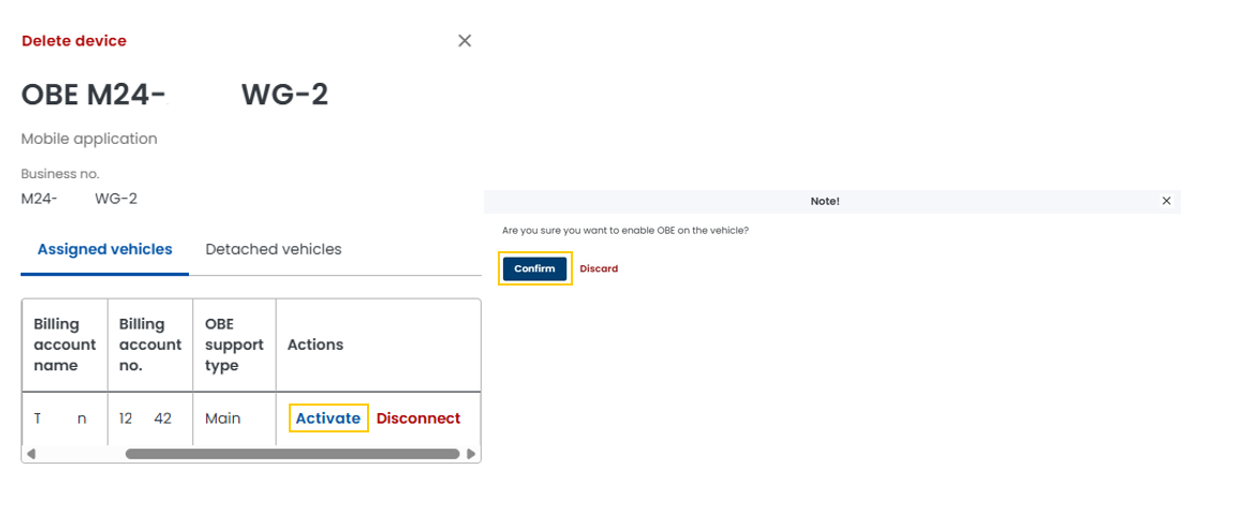
Activate the device:
Go to the Actions box in the right-hand pane and click the Activate link;
Next, select the Confirm button.
See the OCA device activation screenshot:
Managing devices in the OCA
You can always:
Deactivate the device;
Unassign it from the vehicle;
Reassign the device to another vehicle;
Delete the device.
Help and instructions
You can find detailed information about device management in the User Panel – Manage in the OCA.